

Students often juggle assignments, notes, exams, projects, research, and extracurricular commitments—and sometimes the entire circus collapses in a heap of sticky notes and half-finished reminders. Notion EDU brings order to the chaos by offering a single digital workspace where students and teachers can create notes, databases, calendars, study dashboards, project boards, course outlines, and more. It’s flexible, customizable, and surprisingly fun to use once you get the hang of it.
How the Tool Works (Cost, Features, Learning Curve)
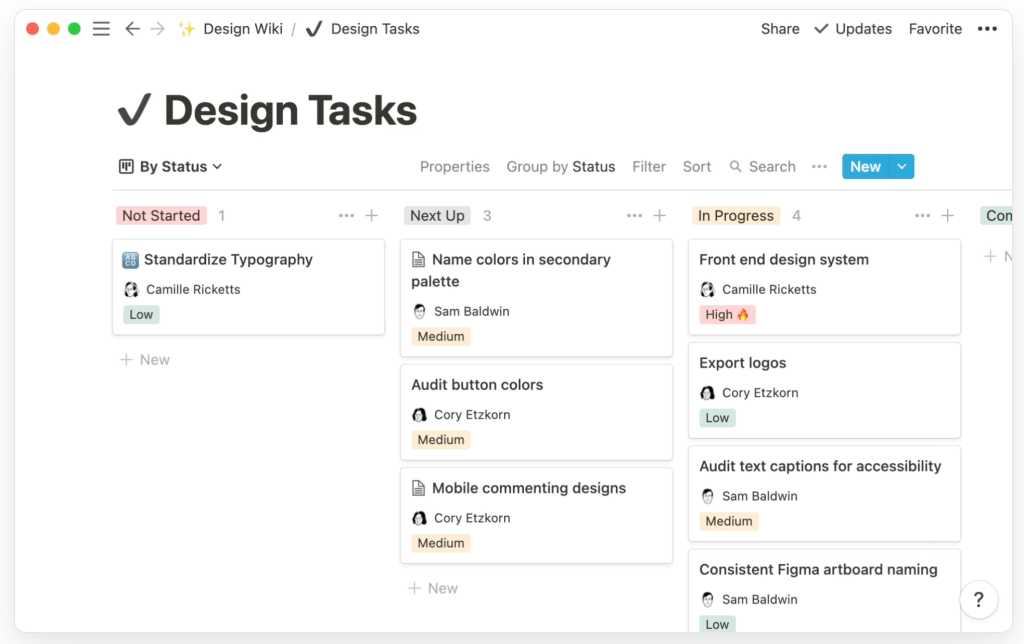
Notion combines documents, task lists, databases, and calendars into one space. A single page can include text, images, embedded Figma files, videos, checklists, and linked databases. For example, a “Design Wiki” might house style guides, prototypes, research notes, and stakeholder feedback side by side, with everything tagged and searchable. Users can build custom workflows for projects, from idea to final deliverable, and connect related pages with backlinks. Notion EDU is free for students and teachers with an academic email, while paid plans exist for larger teams and enterprises that need advanced permissions and security. The learning curve feels moderate at first because it’s so flexible, but most users become comfortable after experimenting with a few templates and learning how to use basic building blocks (pages, databases, and views).
Educational Benefits (student group, content, objective)
Although the “Notion for design” page speaks directly to professional design teams, the exact same features translate beautifully to education. In a design course, for example, students could maintain a shared workspace that includes a design system, project boards, sprint plans, and critique notes, all stored in Notion. In more traditional academic settings—such as undergraduate or graduate programs—students can create dashboards to track assignments, exams, readings, and research projects. Group projects become easier when everyone can see the same task list, attach files, link prototypes or articles, and keep all discussions in context. For instructors, Notion can serve as a living course hub containing the syllabus, weekly modules, readings, and assignment instructions. This supports objectives like improving organization, increasing transparency for group work, and strengthening collaboration across disciplines.
Potential Problems and How to Overcome Them
There are a few challenges to consider when using Notion in education. First, new users can feel overwhelmed by its flexibility; there is no single “correct” way to set up a workspace, which can lead to confusion or overcomplicated pages. This can be minimized by providing students with simple starter templates (for example, a basic course dashboard and a group project board) and gradually adding complexity only as needed. Second, since Notion is a cloud-based platform, reliable internet access is important for full functionality, though offline support has improved over time. Finally, collaboration can get messy if teams do not agree on naming conventions or page structure. Instructors can address this by modeling a clear, consistent layout and setting expectations about where different types of content should live within the workspace.
🔗 Learn More: https://www.notion.so/edu
References
Notion Labs, Inc. (2025). Notion for Education. Retrieved from https://www.notion.com/edu


 MedRelatable